Chapter 7: Multi-Agent Collaboration
第 7 章:多智能体协作
While a monolithic agent architecture can be effective for well-defined problems, its capabilities are often constrained when faced with complex, multi-domain tasks. The Multi-Agent Collaboration pattern addresses these limitations by structuring a system as a cooperative ensemble of distinct, specialized agents. This approach is predicated on the principle of task decomposition, where a high-level objective is broken down into discrete sub-problems. Each sub-problem is then assigned to an agent possessing the specific tools, data access, or reasoning capabilities best suited for that task.
虽然单体智能体对于定义明确的问题可能行之有效,但在面对复杂的多领域任务时,其能力往往受到限制。多智能体协作模式通过将系统构建为由不同专门化智能体组成的协作集合来解决这些限制。这种方法基于任务分解原则,将高级目标拆解为离散的子问题,然后将每个子问题分配给拥有最适合该任务的特定工具、数据访问或推理能力的智能体。
For example, a complex research query might be decomposed and assigned to a Research Agent for information retrieval, a Data Analysis Agent for statistical processing, and a Synthesis Agent for generating the final report. The efficacy of such a system is not merely due to the division of labor but is critically dependent on the mechanisms for inter-agent communication. This requires a standardized communication protocol and a shared ontology, allowing agents to exchange data, delegate sub-tasks, and coordinate their actions to ensure the final output is coherent.
例如,一个复杂的研究查询可能被分解并分配给研究智能体进行信息检索、数据分析智能体进行处理,以及综合智能体生成最终输出。这种系统的效能不仅源于劳动分工,更关键的是依赖于智能体间的通信机制。这需要标准化的通信协议和共享本体,允许智能体交换数据、分配任务并协调其行动,以确保最终输出的连贯性。
This distributed architecture offers several advantages, including enhanced modularity, scalability, and robustness, as the failure of a single agent does not necessarily cause a total system failure. The collaboration allows for a synergistic outcome where the collective performance of the multi-agent system surpasses the potential capabilities of any single agent within the ensemble.
这种分布式架构提供了几个优势,包括增强的模块化、可扩展性和稳健性,因为单个智能体故障不一定会导致整个系统故障。协作允许产生协同结果,其中多智能体系统的性能超过集合内任何单个智能体的能力。
Multi-Agent Collaboration Pattern Overview
多智能体协作模式概述
The Multi-Agent Collaboration pattern involves designing systems where multiple independent or semi-independent agents work together to achieve a common goal. Each agent typically has a defined role, specific goals aligned with the overall objective, and potentially access to different tools or knowledge bases. The power of this pattern lies in the interaction and synergy between these agents.
多智能体协作模式涉及设计系统,其中多个独立或半独立的智能体协同工作以实现共同目标。每个智能体有明确定义的角色、与总体目标一致的特定目标,并且可能访问不同的工具或知识库。此模式的力量在于这些智能体之间的协同作用。
Collaboration can take various forms:
协作可以采取各种形式:
- Sequential Handoffs: One agent completes a task and passes its output to another agent for the next step in a pipeline (similar to the Planning pattern, but explicitly involving different agents).
-
顺序交接: 一个智能体处理任务并将其输出传递给另一个智能体进行流水线中的下一步(类似于规划模式,但明确涉及不同的智能体)。
- Parallel Processing: Multiple agents work on different parts of a problem simultaneously, and their results are later combined.
-
并行处理: 多个智能体同时处理问题的不同部分,然后它们的结果稍后被组合。
- Debate and Consensus: Multi-Agent Collaboration where Agents with varied perspectives and information sources engage in discussions to evaluate options, ultimately reaching a consensus or a more informed decision.
-
辩论与共识: 多个智能体协作,持有不同观点和信息来源的智能体通过讨论评估选项,最终达成共识或做出更明智的决策。
- Hierarchical Structures: A manager agent might delegate tasks to worker agents dynamically based on their tool access or plugin capabilities and synthesize their results. Each agent can also handle relevant groups of tools, rather than a single agent handling all the tools.
-
层次结构: 管理者智能体根据工具访问或插件能力动态将任务委托给工作智能体,并综合其结果。每个智能体管理一组相关工具,而非由单个智能体处理所有事务。
- Expert Teams: Agents with specialized knowledge in different domains (e.g., a researcher, a writer, an editor) collaborate to produce a complex output.
-
专家团队: 在不同领域具有专业知识的智能体(例如,研究员、作家、编辑)协作产生复杂输出。
- Critic-Reviewer: Agents create initial outputs such as plans, drafts, or answers. A second group of agents then critically assesses this output for adherence to policies, security, compliance, correctness, quality, and alignment with organizational objectives. The original creator or a final agent revises the output based on this feedback. This pattern is particularly effective for code generation, research writing, logic checking, and ensuring ethical alignment. The advantages of this approach include increased robustness, improved quality, and a reduced likelihood of hallucinations or errors.
- 批评者-审查者: 一个智能体生成初始输出,如计划、草稿或答案。第二组智能体批判性地评估此输出是否符合政策、安全性、合规性、正确性、质量以及与组织目标的一致性。原始创建者或最终智能体根据反馈修订输出。此模式对于代码生成、研究写作、逻辑检查和确保道德一致性特别有效。这种方法的优势包括增强的稳健性、改进的质量以及减少幻觉或错误的可能性。
A multi-agent system (see Fig.1) fundamentally comprises the delineation of agent roles and responsibilities, the establishment of communication channels through which agents exchange information, and the formulation of a task flow or interaction protocol that directs their collaborative endeavors.
多智能体系统(见图1)从根本上包括界定智能体角色与职责、建立智能体交换信息的通信渠道,以及制定指导其协作努力的任务流或交互协议。
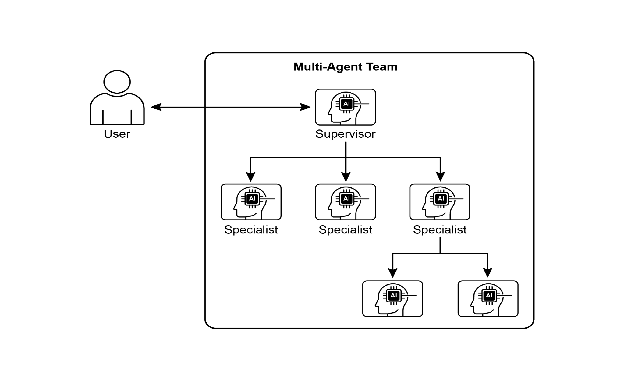
Fig.1: Example of multi-agent system 图 1:多智能体系统示例
Frameworks such as Crew AI and Google ADK are engineered to facilitate this paradigm by providing structures for the specification of agents, tasks, and their interactive procedures. This approach is particularly effective for challenges necessitating a variety of specialized knowledge, encompassing multiple discrete phases, or leveraging the advantages of concurrent processing and the corroboration of information across agents.
像 CrewAI 和 Google ADK 这样的框架旨在通过提供智能体、任务及其交互程序的规范结构来促进这种范式。这种方法对于需要各种专业知识、包含多个离散阶段或能从并发处理和跨智能体确认中获益的挑战特别有效。
Practical Applications & Use Cases
实际应用与用例
Multi-Agent Collaboration is a powerful pattern applicable across numerous domains:
多智能体协作是一种适用于众多领域的强大模式:
- Complex Research and Analysis: A team of agents could collaborate on a research project. One agent might specialize in searching academic databases, another in summarizing findings, a third in identifying trends, and a fourth in synthesizing the information into a report. This mirrors how a human research team might operate.
-
复杂研究和分析: 一组智能体协作完成研究项目。一个智能体搜索学术数据库,另一个总结发现,第三个识别趋势,第四个将信息综合成报告。这反映了人类研究团队可能如何运作。
- Software Development: Imagine agents collaborating on building software. One agent could be a requirements analyst, another a code generator, a third a tester, and a fourth a documentation writer. They could pass outputs between each other to build and verify components.
-
软件开发: 想象智能体构建软件。一个智能体是需求分析师,另一个是代码生成器,第三个是测试员,第四个是文档编写者。他们可以在彼此之间传递输出以构建和验证组件。
- Creative Content Generation: Creating a marketing campaign could involve a market research agent, a copywriter agent, a graphic design agent (using image generation tools), and a social media scheduling agent, all working together.
-
创意内容生成: 创建营销活动可能涉及市场研究智能体、文案撰写智能体、图形设计智能体(使用图像生成工具)和社交媒体调度智能体,所有这些都在一起工作。
- Financial Analysis: A multi-agent system could analyze financial markets. Agents might specialize in fetching stock data, analyzing news sentiment, performing technical analysis, and generating investment recommendations.
-
财务分析: 多智能体可以分析金融市场。智能体可能专门获取股票数据、分析新闻情绪、执行技术分析和生成投资建议。
- Customer Support Escalation: A front-line support agent could handle initial queries, escalating complex issues to a specialist agent (e.g., a technical expert or a billing specialist) when needed, demonstrating a sequential handoff based on problem complexity.
-
客户支持升级: 前线支持智能体处理初始查询,在需要时将复杂问题升级给专家智能体(例如,技术专家或计费专家),展示基于问题复杂性的顺序交接。
- Supply Chain Optimization: Agents could represent different nodes in a supply chain (suppliers, manufacturers, distributors) and collaborate to optimize inventory levels, logistics, and scheduling in response to changing demand or disruptions.
-
供应链优化: 多个智能体代表供应链中的不同节点(供应商、制造商、分销商)并协作优化库存水平、物流和调度以响应需求变化或中断。
- Network Analysis & Remediation: Autonomous operations benefit greatly from an agentic architecture, particularly in failure pinpointing. Multiple agents can collaborate to triage and remediate issues, suggesting optimal actions. These agents can also integrate with traditional machine learning models and tooling, leveraging existing systems while simultaneously offering the advantages of Generative AI.
- 网络分析与修复: 自主操作从多智能体协作中受益匪浅,特别是在故障定位方面。多个智能体协作分类和修复问题,建议最佳行动。这些智能体还可以与传统机器学习模型和工具集成,充分利用现有系统,同时提供生成式 AI 的优势。
The capacity to delineate specialized agents and meticulously orchestrate their interrelationships empowers developers to construct systems exhibiting enhanced modularity, scalability, and the ability to address complexities that would prove insurmountable for a singular, integrated agent.
界定专门智能体以及编排其相互关系的能力使开发人员能够构建展现增强模块化、可扩展性以及处理单个集成智能体无法处理的复杂性的系统。
Multi-Agent Collaboration: Exploring Interrelationships and Communication Structures
多智能体协作:探索相互关系和通信结构
Understanding the intricate ways in which agents interact and communicate is fundamental to designing effective multi-agent systems. As depicted in Fig. 2, a spectrum of interrelationship and communication models exists, ranging from the simplest single-agent scenario to complex, custom-designed collaborative frameworks. Each model presents unique advantages and challenges, influencing the overall efficiency, robustness, and adaptability of the multi-agent system.
理解智能体交互和通信的复杂方式对于设计有效的多智能体系统至关重要。如图 2 所示,存在一系列相互关系和通信模型,从最简单的单智能体场景,到定制设计的协作框架。每个模型都呈现独特的优势和挑战,影响多智能体系统的整体稳健性和适应性。
1. Single Agent: At the most basic level, a “Single Agent” operates autonomously without direct interaction or communication with other entities. While this model is straightforward to implement and manage, its capabilities are inherently limited by the individual agent’s scope and resources. It is suitable for tasks that are decomposable into independent sub-problems, each solvable by a single, self-sufficient agent. 1. 单智能体: 在最基本的层面上,”单智能体”在没有与其他实体直接交互或通信的情况下自主运行。虽然此模型易于实现和管理,但其能力固有地受到单个智能体的技能和资源的限制。它适用于可分解为独立子问题的任务,每个子问题都可由单个自给自足的智能体处理。
2. Network: The “Network” model represents a significant step towards collaboration, where multiple agents interact directly with each other in a decentralized fashion. Communication typically occurs peer-to-peer, allowing for the sharing of information, resources, and even tasks. This model fosters resilience, as the failure of one agent does not necessarily cripple the entire system. However, managing communication overhead and ensuring coherent decision-making in a large, unstructured network can be challenging. 2. 网络: “网络”模型代表向协作迈出的重要一步,其中多个智能体以去中心化方式直接相互交互。通信通常以点对点方式进行,允许共享信息、资源甚至任务。此模型促进弹性,因为一个智能体的故障不一定会使整个系统瘫痪。然而,管理通信开销并确保大型非结构化网络中的连贯决策可能具有挑战性。
3. Supervisor: In the “Supervisor” model, a dedicated agent, the “supervisor,” oversees and coordinates the activities of a group of subordinate agents. The supervisor acts as a central hub for communication, task allocation, and conflict resolution. This hierarchical structure offers clear lines of authority and can simplify management and control. However, it introduces a single point of failure (the supervisor) and can become a bottleneck if the supervisor is overwhelmed by a large number of subordinates or complex tasks. 3. 监督者: 在”监督者”模型中,专用智能体(”监督者”)监督和协调一组下属智能体的活动。监督者充当通信、任务分配和冲突解决的中心枢纽。这种层次结构提供了清晰的权限线,可以简化管理和控制。然而,它引入了单点故障(监督者),如果监督者被大量下属或复杂任务压倒,可能会成为瓶颈。
4. Supervisor as a Tool: This model is a nuanced extension of the “Supervisor” concept, where the supervisor’s role is less about direct command and control and more about providing resources, guidance, or analytical support to other agents. The supervisor might offer tools, data, or computational services that enable other agents to perform their tasks more effectively, without necessarily dictating their every action. This approach aims to leverage the supervisor’s capabilities without imposing rigid top-down control. 4. 监督者作为工具: 此模型是”监督者”概念的细微扩展,其中监督者的角色不太关乎直接命令和控制,而更多关乎向其他智能体提供资源、指导或分析支持。监督者可能提供工具、数据或计算服务,使其他智能体更有效地执行其任务,而不必规定其每一个行动。这种方法旨在利用监督者的能力,而不施加严格的自上而下控制。
5. Hierarchical: The “Hierarchical” model expands upon the supervisor concept to create a multi-layered organizational structure. This involves multiple levels of supervisors, with higher-level supervisors overseeing lower-level ones, and ultimately, a collection of operational agents at the lowest tier. This structure is well-suited for complex problems that can be decomposed into sub-problems, each managed by a specific layer of the hierarchy. It provides a structured approach to scalability and complexity management, allowing for distributed decision-making within defined boundaries. 5. 层次化: “层次化”模型扩展了监督者概念,创建了多层组织结构。这涉及多个监督者级别,高级监督者监督低级监督者,最终在最低层有一组操作智能体。此结构非常适合可分解为子问题的复杂问题,每个子问题由层次结构的特定层管理。它提供了一种结构化的可扩展性和复杂性管理方法,允许在定义的边界内进行分布式决策。
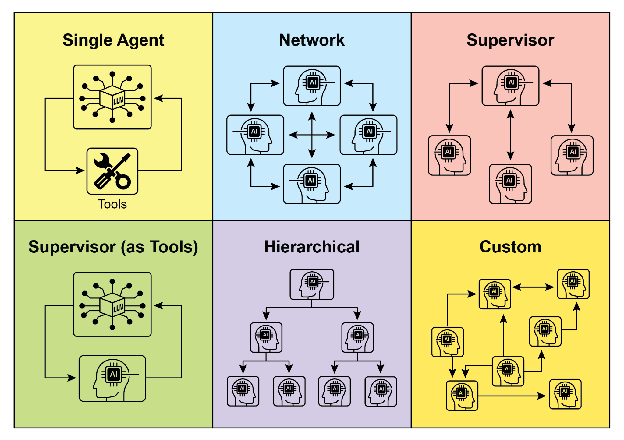
Fig. 2: Agents communicate and interact in various ways. 图 2:智能体以各种方式进行通信和交互。
6. Custom: The “Custom” model represents the ultimate flexibility in multi-agent system design. It allows for the creation of unique interrelationship and communication structures tailored precisely to the specific requirements of a given problem or application. This can involve hybrid approaches that combine elements from the previously mentioned models, or entirely novel designs that emerge from the unique constraints and opportunities of the environment. Custom models often arise from the need to optimize for specific performance metrics, handle highly dynamic environments, or incorporate domain-specific knowledge into the system’s architecture. Designing and implementing custom models typically requires a deep understanding of multi-agent systems principles and careful consideration of communication protocols, coordination mechanisms, and emergent behaviors. 6. 自定义: “自定义”模型代表了多智能体设计的终极灵活性。它允许创建根据给定问题或应用程序的特定要求精确定制的独特相互关系和通信结构。这可能涉及结合前述模型元素的混合方法,或从环境的独特约束和机会中产生的全新设计。自定义模型通常源于需要针对特定性能指标进行优化、处理高度动态的环境或将特定领域知识纳入系统架构。设计和实现自定义模型通常需要对多智能体系统有深入理解,并仔细考虑通信协议、协调机制和涌现行为。
In summary, the choice of interrelationship and communication model for a multi-agent system is a critical design decision. Each model offers distinct advantages and disadvantages, and the optimal choice depends on factors such as the complexity of the task, the number of agents, the desired level of autonomy, the need for robustness, and the acceptable communication overhead. Future advancements in multi-agent systems will likely continue to explore and refine these models, as well as develop new paradigms for collaborative intelligence.
总之,为多智能体系统选择相互关系和通信模型是关键的设计决策。每个模型提供不同的优势和劣势,最佳选择取决于诸如任务复杂性、智能体数量、期望的自主程度、对稳健性的需求以及可接受的通信开销等因素。多智能体系统的未来进展可能会继续探索和完善这些模型,以及开发协作智能的新范式。
Hands-On code (Crew AI)
实操代码(Crew AI)
This Python code defines an AI-powered crew using the CrewAI framework to generate a blog post about AI trends. It starts by setting up the environment, loading API keys from a .env file. The core of the application involves defining two agents: a researcher to find and summarize AI trends, and a writer to create a blog post based on the research.
此 Python 代码使用 CrewAI 框架定义了一个 AI 驱动的团队来生成关于 AI 趋势的博客文章。它首先设置环境,从 .env 文件加载 API 密钥。应用程序的核心涉及定义两个智能体:一个研究员用于查找和总结 AI 趋势,一个作家用于基于研究创建博客文章。
Two tasks are defined accordingly: one for researching the trends and another for writing the blog post, with the writing task depending on the output of the research task. These agents and tasks are then assembled into a Crew, specifying a sequential process where tasks are executed in order. The Crew is initialized with the agents, tasks, and a language model (specifically the “gemini-2.0-flash” model). The main function executes this crew using the kickoff() method, orchestrating the collaboration between the agents to produce the desired output. Finally, the code prints the final result of the crew’s execution, which is the generated blog post.
相应地定义了两个任务:一个用于研究趋势,另一个用于撰写博客文章,写作任务依赖于研究任务的输出。然后将这些智能体和任务组装成一个团队,指定顺序流程,其中任务按顺序执行。团队使用智能体、任务和语言模型(特别是”gemini-2.0-flash”模型)初始化。主函数使用 kickoff() 方法执行此团队,编排智能体之间的协作以产生所需的输出。最后,代码打印团队执行的最终结果,即生成的博客文章。
1
2
3
4
5
6
7
8
9
10
11
12
13
14
15
16
17
18
19
20
21
22
23
24
25
26
27
28
29
30
31
32
33
34
35
36
37
38
39
40
41
42
43
44
45
46
47
48
49
50
51
52
53
54
55
56
57
58
59
60
61
62
63
64
65
66
67
68
69
70
71
72
73
import os
from dotenv import load_dotenv
from crewai import Agent, Task, Crew, Process
from langchain_google_genai import ChatGoogleGenerativeAI

def setup_environment():
   """Loads environment variables and checks for the required API key."""
   load_dotenv()
   if not os.getenv("GOOGLE_API_KEY"):
       raise ValueError("GOOGLE_API_KEY not found. Please set it in your .env file.")

def main():
   """
   Initializes and runs the AI crew for content creation using the latest Gemini model.
   """
   setup_environment()
   # Define the language model to use.
   # Updated to a model from the Gemini 2.0 series for better performance and features.
   # For cutting-edge (preview) capabilities, you could use "gemini-2.5-flash".
   llm = ChatGoogleGenerativeAI(model="gemini-2.0-flash")

   # Define Agents with specific roles and goals
   researcher = Agent(
       role='Senior Research Analyst',
       goal='Find and summarize the latest trends in AI.',
       backstory="You are an experienced research analyst with a knack for identifying key trends and synthesizing information.",
       verbose=True,
       allow_delegation=False,
   )

   writer = Agent(
       role='Technical Content Writer',
       goal='Write a clear and engaging blog post based on research findings.',
       backstory="You are a skilled writer who can translate complex technical topics into accessible content.",
       verbose=True,
       allow_delegation=False,
   )

   # Define Tasks for the agents
   research_task = Task(
       description="Research the top 3 emerging trends in Artificial Intelligence in 2024-2025. Focus on practical applications and potential impact.",
       expected_output="A detailed summary of the top 3 AI trends, including key points and sources.",
       agent=researcher,
   )

   writing_task = Task(
       description="Write a 500-word blog post based on the research findings. The post should be engaging and easy for a general audience to understand.",
       expected_output="A complete 500-word blog post about the latest AI trends.",
       agent=writer,
       context=[research_task],
   )

   # Create the Crew
   blog_creation_crew = Crew(
       agents=[researcher, writer],
       tasks=[research_task, writing_task],
       process=Process.sequential,
       llm=llm,
       verbose=2 # Set verbosity for detailed crew execution logs
   )

   # Execute the Crew
   print("## Running the blog creation crew with Gemini 2.0 Flash... ##")
   try:
       result = blog_creation_crew.kickoff()
       print("\n------------------\n")
       print("## Crew Final Output ##")
       print(result)
   except Exception as e:
       print(f"\nAn unexpected error occurred: {e}")

if __name__ == "__main__":
   main()
We will now delve into further examples within the Google ADK framework, with particular emphasis on hierarchical, parallel, and sequential coordination paradigms, alongside the implementation of an agent as an operational instrument.
我们现在将深入研究 Google ADK 框架中的更多示例,特别强调层次化、并行和顺序协调范式,以及将智能体作为操作工具。
Hands-on Code (Google ADK)
实操代码(Google ADK)
The following code example demonstrates the establishment of a hierarchical agent structure within the Google ADK through the creation of a parent-child relationship. The code defines two types of agents: LlmAgent and a custom TaskExecutor agent derived from BaseAgent. The TaskExecutor is designed for specific, non-LLM tasks and in this example, it simply yields a “Task finished successfully” event. An LlmAgent named greeter is initialized with a specified model and instruction to act as a friendly greeter. The custom TaskExecutor is instantiated as task_doer. A parent LlmAgent called coordinator is created, also with a model and instructions. The coordinator’s instructions guide it to delegate greetings to the greeter and task execution to the task_doer. The greeter and task_doer are added as sub-agents to the coordinator, establishing a parent-child relationship. The code then asserts that this relationship is correctly set up. Finally, it prints a message indicating that the agent hierarchy has been successfully created.
以下代码示例演示了通过创建父子关系在 Google ADK 中建立层次化智能体结构。代码定义了两种类型的智能体:LlmAgent 和从 BaseAgent 派生的自定义 TaskExecutor 智能体。TaskExecutor 专为特定的非 LLM 任务而设计,在此示例中,它只是生成”任务成功完成”事件。使用指定的模型和指令初始化名为 greeter 的 LlmAgent,以充当友好的欢迎者。自定义 TaskExecutor 实例化为 task_doer。创建名为 coordinator 的父 LlmAgent,也带有模型和指令。coordinator 的指令引导它将欢迎委托给 greeter,将任务执行委托给 task_doer。greeter 和 task_doer 作为子智能体添加到 coordinator,建立父子关系。然后代码断言此关系设置正确。最后,它打印一条消息,指示已成功创建智能体层次结构。
1
2
3
4
5
6
7
8
9
10
11
12
13
14
15
16
17
18
19
20
21
22
23
24
25
26
27
28
29
30
31
32
33
34
35
36
37
38
39
40
41
42
43
44
45
from google.adk.agents import LlmAgent, BaseAgent
from google.adk.agents.invocation_context import InvocationContext
from google.adk.events import Event
from typing import AsyncGenerator

## Correctly implement a custom agent by extending BaseAgent
class TaskExecutor(BaseAgent):
   """A specialized agent with custom, non-LLM behavior."""
   name: str = "TaskExecutor"
   description: str = "Executes a predefined task."

   async def _run_async_impl(self, context: InvocationContext) -> AsyncGenerator[Event, None]:
       """Custom implementation logic for the task."""
       # This is where your custom logic would go.
       # For this example, we'll just yield a simple event.
       yield Event(author=self.name, content="Task finished successfully.")

## Define individual agents with proper initialization
## LlmAgent requires a model to be specified.
greeter = LlmAgent(
   name="Greeter",
   model="gemini-2.0-flash-exp",
   instruction="You are a friendly greeter."
)

task_doer = TaskExecutor() # Instantiate our concrete custom agent

## Create a parent agent and assign its sub-agents
## The parent agent's description and instructions should guide its delegation logic.
coordinator = LlmAgent(
   name="Coordinator",
   model="gemini-2.0-flash-exp",
   description="A coordinator that can greet users and execute tasks.",
   instruction="When asked to greet, delegate to the Greeter. When asked to perform a task, delegate to the TaskExecutor.",
   sub_agents=[
       greeter,
       task_doer
   ]
)

## The ADK framework automatically establishes the parent-child relationships.
## These assertions will pass if checked after initialization.
assert greeter.parent_agent == coordinator
assert task_doer.parent_agent == coordinator
print("Agent hierarchy created successfully.")
This code excerpt illustrates the employment of the LoopAgent within the Google ADK framework to establish iterative workflows. The code defines two agents: ConditionChecker and ProcessingStep. ConditionChecker is a custom agent that checks a “status” value in the session state. If the “status” is “completed”, ConditionChecker escalates an event to stop the loop. Otherwise, it yields an event to continue the loop. ProcessingStep is an LlmAgent using the “gemini-2.0-flash-exp” model. Its instruction is to perform a task and set the session “status” to “completed” if it’s the final step. A LoopAgent named StatusPoller is created. StatusPoller is configured with max_iterations=10. StatusPoller includes both ProcessingStep and an instance of ConditionChecker as sub-agents. The LoopAgent will execute the sub-agents sequentially for up to 10 iterations, stopping if ConditionChecker finds the status is “completed”.
此代码摘录说明了在 Google ADK 框架中使用 LoopAgent 建立迭代工作流。代码定义了两个智能体:ConditionChecker 和 ProcessingStep。ConditionChecker 是一个自定义智能体,检查会话状态中的”status”值。如果”status”为”completed”,ConditionChecker 触发升级事件以停止循环。否则,它生成事件以继续循环。ProcessingStep 是使用”gemini-2.0-flash-exp”模型的 LlmAgent。其指令是执行任务,如果是最后一步则将会话”status”设置为”completed”。创建名为 StatusPoller 的 LoopAgent。StatusPoller 配置为 max_iterations=10。StatusPoller 包括 ProcessingStep 和 ConditionChecker 实例作为子智能体。LoopAgent 将顺序执行子智能体最多 10 次迭代,如果 ConditionChecker 发现状态为”completed”则停止。
1
2
3
4
5
6
7
8
9
10
11
12
13
14
15
16
17
18
19
20
21
22
23
24
25
26
27
28
29
30
31
32
33
34
35
36
37
38
39
40
41
42
43
44
45
46
import asyncio
from typing import AsyncGenerator
from google.adk.agents import LoopAgent, LlmAgent, BaseAgent
from google.adk.events import Event, EventActions
from google.adk.agents.invocation_context import InvocationContext

## Best Practice: Define custom agents as complete, self-describing classes.
class ConditionChecker(BaseAgent):
   """A custom agent that checks for a 'completed' status in the session state."""
   name: str = "ConditionChecker"
   description: str = "Checks if a process is complete and signals the loop to stop."

   async def _run_async_impl(
       self, context: InvocationContext
   ) -> AsyncGenerator[Event, None]:
       """Checks state and yields an event to either continue or stop the loop."""
       status = context.session.state.get("status", "pending")
       is_done = (status == "completed")
       if is_done:
           # Escalate to terminate the loop when the condition is met.
           yield Event(author=self.name, actions=EventActions(escalate=True))
       else:
           # Yield a simple event to continue the loop.
           yield Event(author=self.name, content="Condition not met, continuing loop.")

## Correction: The LlmAgent must have a model and clear instructions.
process_step = LlmAgent(
   name="ProcessingStep",
   model="gemini-2.0-flash-exp",
   instruction="You are a step in a longer process. Perform your task. If you are the final step, update session state by setting 'status' to 'completed'."
)

## The LoopAgent orchestrates the workflow.
poller = LoopAgent(
   name="StatusPoller",
   max_iterations=10,
   sub_agents=[
       process_step,
       ConditionChecker() # Instantiating the well-defined custom agent.
   ]
)

## This poller will now execute 'process_step'
## and then 'ConditionChecker'
## repeatedly until the status is 'completed' or 10 iterations
## have passed.
This code excerpt elucidates the SequentialAgent pattern within the Google ADK, engineered for the construction of linear workflows. This code defines a sequential agent pipeline using the google.adk.agents library. The pipeline consists of two agents, step1 and step2. step1 is named “Step1_Fetch” and its output will be stored in the session state under the key “data”. step2 is named “Step2_Process” and is instructed to analyze the information stored in session.state[“data”] and provide a summary. The SequentialAgent named “MyPipeline” orchestrates the execution of these sub-agents. When the pipeline is run with an initial input, step1 will execute first. The response from step1 will be saved into the session state under the key “data”. Subsequently, step2 will execute, utilizing the information that step1 placed into the state as per its instruction. This structure allows for building workflows where the output of one agent becomes the input for the next. This is a common pattern in creating multi-step AI or data processing pipelines.
此代码摘录介绍了 Google ADK 中的 SequentialAgent 模式,专为构建线性工作流而设计。此代码使用 google.adk.agents 库定义顺序智能体管道。管道由两个智能体组成,step1 和 step2。step1 命名为”Step1_Fetch”,其输出将存储在会话状态中的键”data”下。step2 命名为”Step2_Process”,并被指示分析存储在 session.state[“data”] 中的信息并提供摘要。名为”MyPipeline”的 SequentialAgent 编排这些子智能体的执行。当使用初始输入运行管道时,step1 将首先执行。来自 step1 的响应将保存到键”data”下的会话状态中。随后,step2 将执行,根据其指令利用 step1 放入状态的信息。此结构允许构建工作流,其中一个智能体的输出成为下一个智能体的输入。这是创建多步 AI 或数据处理管道的常见模式。
1
2
3
4
5
6
7
8
9
10
11
12
13
14
15
16
17
18
19
20
from google.adk.agents import SequentialAgent, Agent

## This agent's output will be saved to session.state["data"]
step1 = Agent(name="Step1_Fetch", output_key="data")

## This agent will use the data from the previous step.
## We instruct it on how to find and use this data.
step2 = Agent(
   name="Step2_Process",
   instruction="Analyze the information found in state['data'] and provide a summary."
)

pipeline = SequentialAgent(
   name="MyPipeline",
   sub_agents=[step1, step2]
)

## When the pipeline is run with an initial input, Step1 will execute,
## its response will be stored in session.state["data"], and then
## Step2 will execute, using the information from the state as instructed.
The following code example illustrates the ParallelAgent pattern within the Google ADK, which facilitates the concurrent execution of multiple agent tasks. The data_gatherer is designed to run two sub-agents concurrently: weather_fetcher and news_fetcher. The weather_fetcher agent is instructed to get the weather for a given location and store the result in session.state[“weather_data”]. Similarly, the news_fetcher agent is instructed to retrieve the top news story for a given topic and store it in session.state[“news_data”]. Each sub-agent is configured to use the “gemini-2.0-flash-exp” model. The ParallelAgent orchestrates the execution of these sub-agents, allowing them to work in parallel. The results from both weather_fetcher and news_fetcher would be gathered and stored in the session state. Finally, the example shows how to access the collected weather and news data from the final_state after the agent’s execution is complete.
以下代码示例说明了 Google ADK 中的 ParallelAgent 模式,它促进多个智能体并发执行任务。data_gatherer 设计为并发运行两个子智能体:weather_fetcher 和 news_fetcher。weather_fetcher 智能体被指示获取给定位置的天气并将结果存储在 session.state[“weather_data”] 中。同样,news_fetcher 智能体被指示检索给定主题的头条新闻故事并将其存储在 session.state[“news_data”] 中。每个子智能体都配置为使用”gemini-2.0-flash-exp”模型。ParallelAgent 编排这些子智能体的执行,允许它们并行工作。来自 weather_fetcher 和 news_fetcher 的结果将被收集并存储在会话状态中。最后,示例展示了如何在智能体执行完成后从 final_state 访问收集的天气和新闻数据。
1
2
3
4
5
6
7
8
9
10
11
12
13
14
15
16
17
18
19
20
21
22
23
24
25
26
27
28
29
from google.adk.agents import Agent, ParallelAgent

## It's better to define the fetching logic as tools for the agents
## For simplicity in this example, we'll embed the logic in the agent's instruction.
## In a real-world scenario, you would use tools.

## Define the individual agents that will run in parallel
weather_fetcher = Agent(
   name="weather_fetcher",
   model="gemini-2.0-flash-exp",
   instruction="Fetch the weather for the given location and return only the weather report.",
   output_key="weather_data"  # The result will be stored in session.state["weather_data"]
)

news_fetcher = Agent(
   name="news_fetcher",
   model="gemini-2.0-flash-exp",
   instruction="Fetch the top news story for the given topic and return only that story.",
   output_key="news_data"      # The result will be stored in session.state["news_data"]
)

## Create the ParallelAgent to orchestrate the sub-agents
data_gatherer = ParallelAgent(
   name="data_gatherer",
   sub_agents=[
       weather_fetcher,
       news_fetcher
   ]
)
The provided code segment exemplifies the “Agent as a Tool” paradigm within the Google ADK, enabling an agent to utilize the capabilities of another agent in a manner analogous to function invocation. Specifically, the code defines an image generation system using Google’s LlmAgent and AgentTool classes. It consists of two agents: a parent artist_agent and a sub-agent image_generator_agent. The generate_image function is a simple tool that simulates image creation, returning mock image data. The image_generator_agent is responsible for using this tool based on a text prompt it receives. The artist_agent’s role is to first invent a creative image prompt. It then calls the image_generator_agent through an AgentTool wrapper. The AgentTool acts as a bridge, allowing one agent to use another agent as a tool. When the artist_agent calls the image_tool, the AgentTool invokes the image_generator_agent with the artist’s invented prompt. The image_generator_agent then uses the generate_image function with that prompt. Finally, the generated image (or mock data) is returned back up through the agents. This architecture demonstrates a layered agent system where a higher-level agent orchestrates a lower-level, specialized agent to perform a task.
提供的代码段示例了 Google ADK 中的”智能体作为工具”范式,使智能体能够以类似于工具调用的方式利用另一个智能体的能力。具体来说,代码使用 Google 的 LlmAgent 和 AgentTool 类定义了一个图像生成系统。它由两个智能体组成:父 artist_agent 和子智能体 image_generator_agent。generate_image 函数是一个简单的工具,模拟图像创建,返回模拟图像数据。image_generator_agent 负责根据其接收的文本提示词使用此工具。artist_agent 的角色是首先构思一个创意图像提示词。然后它通过 AgentTool 包装器调用 image_generator_agent。AgentTool 充当桥梁,允许一个智能体将另一个智能体用作工具。当 artist_agent 调用 image_tool 时,AgentTool 使用艺术家构思的提示词调用 image_generator_agent。image_generator_agent 然后使用该提示词调用 generate_image 函数。最后,生成的图像(或模拟数据)通过智能体返回。此架构演示了一个分层智能体系统,其中更高级别的智能体编排较低级别的专门智能体以执行任务。
1
2
3
4
5
6
7
8
9
10
11
12
13
14
15
16
17
18
19
20
21
22
23
24
25
26
27
28
29
30
31
32
33
34
35
36
37
38
39
40
41
42
43
44
45
46
47
48
49
50
51
52
53
54
55
56
57
from google.adk.agents import LlmAgent
from google.adk.tools import agent_tool
from google.genai import types

## 1. A simple function tool for the core capability.
## This follows the best practice of separating actions from reasoning.
def generate_image(prompt: str) -> dict:
   """
   Generates an image based on a textual prompt.
   Args:
       prompt: A detailed description of the image to generate.
   Returns:
       A dictionary with the status and the generated image bytes.
   """
   print(f"TOOL: Generating image for prompt: '{prompt}'")
   # In a real implementation, this would call an image generation API.
   # For this example, we return mock image data.
   mock_image_bytes = b"mock_image_data_for_a_cat_wearing_a_hat"
   return {
       "status": "success",
       # The tool returns the raw bytes, the agent will handle the Part creation.
       "image_bytes": mock_image_bytes,
       "mime_type": "image/png"
   }

## 2. Refactor the ImageGeneratorAgent into an LlmAgent.
## It now correctly uses the input passed to it.
image_generator_agent = LlmAgent(
   name="ImageGen",
   model="gemini-2.0-flash",
   description="Generates an image based on a detailed text prompt.",
   instruction=(
       "You are an image generation specialist. Your task is to take the user's request "
       "and use the `generate_image` tool to create the image. "
       "The user's entire request should be used as the 'prompt' argument for the tool. "
       "After the tool returns the image bytes, you MUST output the image."
   ),
   tools=[generate_image]
)

## 3. Wrap the corrected agent in an AgentTool.
## The description here is what the parent agent sees.
image_tool = agent_tool.AgentTool(
   agent=image_generator_agent,
   description="Use this tool to generate an image. The input should be a descriptive prompt of the desired image."
)

## 4. The parent agent remains unchanged. Its logic was correct.
artist_agent = LlmAgent(
   name="Artist",
   model="gemini-2.0-flash",
   instruction=(
       "You are a creative artist. First, invent a creative and descriptive prompt for an image. "
       "Then, use the `ImageGen` tool to generate the image using your prompt."
   ),
   tools=[image_tool]
)
At a Glance
速览
What: Complex problems often exceed the capabilities of a single, monolithic LLM-based agent. A solitary agent may lack the diverse, specialized skills or access to the specific tools needed to address all parts of a multifaceted task. This limitation creates a bottleneck, reducing the system’s overall effectiveness and scalability. As a result, tackling sophisticated, multi-domain objectives becomes inefficient and can lead to incomplete or suboptimal outcomes. 问题背景: 复杂问题通常超出单个单体基于 LLM 的智能体的能力范围。单个智能体往往缺乏解决多方面任务所有部分所需的多样化专业技能或对特定工具的访问。此限制造成瓶颈,降低系统的整体效率和可扩展性。因此,处理复杂的多领域目标变得低效,并可能导致不完整或次优的结果。
Why: The Multi-Agent Collaboration pattern offers a standardized solution by creating a system of multiple, cooperating agents. A complex problem is broken down into smaller, more manageable sub-problems. Each sub-problem is then assigned to a specialized agent with the precise tools and capabilities required to solve it. These agents work together through defined communication protocols and interaction models like sequential handoffs, parallel workstreams, or hierarchical delegation. This agentic, distributed approach creates a synergistic effect, allowing the group to achieve outcomes that would be impossible for any single agent. 解决方案: 多智能体协作模式通过创建多个协作智能体的系统提供了标准化解决方案。复杂问题被分解为更小、更易于管理的子问题。然后将每个子问题分配给具有解决它所需的精确工具和能力的专门智能体。这些智能体通过精心设计的通信协议和交互模型(如顺序交接、并行工作流或层次化委托)协同工作。这种分布式智能体方法创造了协同效应,使整个系统能够实现任何单个智能体都无法单独实现的成果。
Rule of thumb: Use this pattern when a task is too complex for a single agent and can be decomposed into distinct sub-tasks requiring specialized skills or tools. It is ideal for problems that benefit from diverse expertise, parallel processing, or a structured workflow with multiple stages, such as complex research and analysis, software development, or creative content generation. 实践建议: 当任务对于单个智能体太复杂并且可以分解为需要专业技能或工具的不同子任务时,使用此模式。它非常适合受益于多样化专业知识、并行处理或具有多个阶段的结构化工作流的问题,例如复杂的研究和分析、软件开发或创意内容生成。
Visual summary 可视化摘要
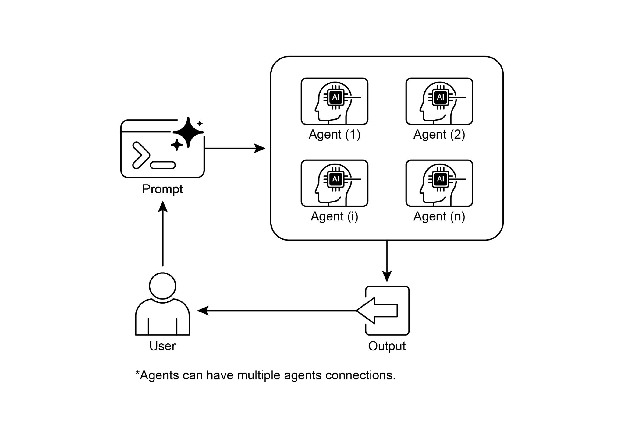
Fig.3: Multi-Agent design pattern 图 3:多智能体模式
Key Takeaways
关键要点
- Multi-agent collaboration involves multiple agents working together to achieve a common goal.
-
多智能体协作涉及多个智能体协同工作以实现共同目标。
- This pattern leverages specialized roles, distributed tasks, and inter-agent communication.
-
此模式利用专业角色、分布式任务和智能体间通信。
- Collaboration can take forms like sequential handoffs, parallel processing, debate, or hierarchical structures.
-
协作可以采取顺序交接、并行处理、辩论或层次结构等形式。
- This pattern is ideal for complex problems requiring diverse expertise or multiple distinct stages.
- 此模式非常适合需要多样化专业知识或多个不同阶段的复杂问题。
Conclusion
结论
This chapter explored the Multi-Agent Collaboration pattern, demonstrating the benefits of orchestrating multiple specialized agents within systems. We examined various collaboration models, emphasizing the pattern’s essential role in addressing complex, multifaceted problems across diverse domains. Understanding agent collaboration naturally leads to an inquiry into their interactions with the external environment.
本章探讨了多智能体协作模式,展示了在系统内编排多个专门智能体的强大之处。我们研究了各种协作模型,强调该模式在跨不同领域解决复杂多方面问题中的关键作用。理解智能体间的交互自然会引出对其与外部环境交互的探究。
References
参考文献
- Multi-Agent Collaboration Mechanisms: A Survey of LLMs, https://arxiv.org/abs/2501.06322
- Multi-Agent System — The Power of Collaboration, https://aravindakumar.medium.com/introducing-multi-agent-frameworks-the-power-of-collaboration-e9db31bba1b6